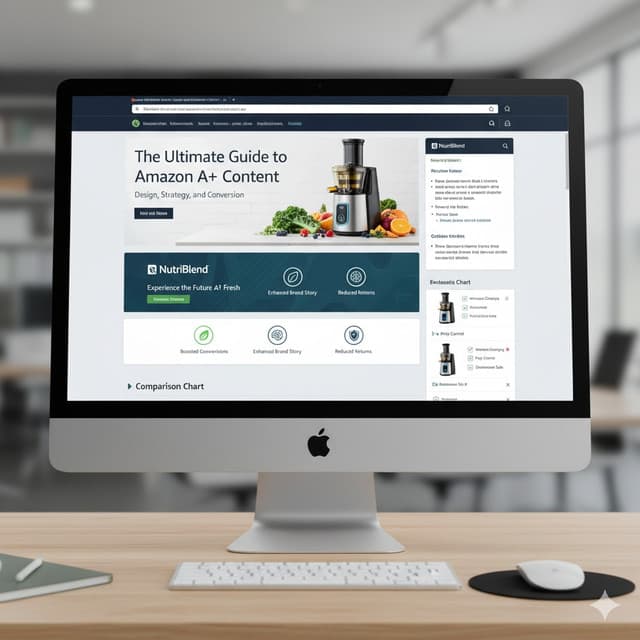
The Ultimate Guide to Amazon A+ Content: Design, Strategy, and Conversion
In today's competitive e-commerce world, standing out on Amazon isn't just about having a great product it's about how you present it...
Let's face it — competition on Amazon is fierce. Every second, hundreds of new sellers are trying to grab the same buyer's attention. So, how do you stand out in a sea of lookalike listings? The answer lies in something simple yet powerful — Amazon A+ Content.
Amazon A+ Content (previously known as Enhanced Brand Content) is your opportunity to go beyond plain text descriptions and tell your brand story visually. It's where you can connect emotionally with your customers, build trust, and drive conversions — all while giving your listings a premium look and feel.
What Is Amazon A+ Content?
Amazon A+ Content is a feature that allows brand-registered sellers to create rich multimedia product descriptions using high-quality images, custom layouts, banners, comparison charts, and storytelling sections. It replaces the dull, text-heavy descriptions with dynamic visuals and formatting that make your listings come alive.
Think of it as your digital storefront inside Amazon — a place where customers can see your brand's values, understand your product benefits clearly, and feel confident enough to hit "Add to Cart."
Why Amazon A+ Content Matters More Than Ever
In a world where attention spans are shrinking and buyers are scrolling fast, first impressions matter. A well-designed A+ section not only looks professional but also influences buying decisions at a psychological level. According to Amazon, listings that include A+ Content can increase sales by up to 10% or more.
Types of Amazon A+ Content
There are two main types of A+ Content:
Basic A+ Content: Available to all brand-registered sellers, it includes simple modules like images, comparison charts, and text blocks.
Premium A+ Content: Also known as A++ Content, this advanced version offers interactive modules, videos, and more customization options — perfect for established brands looking for a luxury presentation.
Design Tips: Creating A+ Content That Converts
Design is where most sellers go wrong — but it's also where you can shine. Your goal is to blend clarity, emotion, and storytelling in a way that speaks directly to your target audience.
1. Lead With Strong Visuals: Use lifestyle images that show your product in action. People don't just buy products — they buy experiences.
2. Keep Text Short and Impactful: Avoid long paragraphs. Use bullet points, bold key terms, and concise benefit-driven language.
3. Stay On Brand: Use your brand colors, tone, and consistent typography across all listings to build recognition.
4. Tell a Story: Explain how your product solves a problem, improves life, or fulfills a need — make it relatable.
5. Add Comparison Charts: Help buyers quickly understand why your product outperforms competitors.
Strategic Approach: Data Meets Creativity
Design grabs attention, but strategy drives sales. Successful A+ Content combines visuals with data-driven insights. Here's how you can be smart about it:
Analyze Your Competitors: Study top-performing listings in your niche. See what type of visuals, tone, and structure they use.
Use Buyer Insights: Read customer reviews to understand what buyers love or dislike. Address those points directly in your content.
Focus on Benefits, Not Just Features: Don't just say "stainless steel blade" — say "cuts through ingredients effortlessly and lasts longer."
Cross-Sell Through Comparison Modules: Showcase similar products or variations from your brand to increase basket value.
Optimizing for Mobile Shoppers
Over 70% of Amazon customers browse and shop from mobile devices. That means your A+ Content needs to look perfect on smaller screens too. Keep these mobile-first tips in mind:
• Use high-contrast colors so text is easily readable on mobile.
• Place your most important information in the top 2 modules.
• Test image and text layouts on mobile previews before publishing.
• Use concise, clear headlines — they're easier to scan on small screens.
Common Mistakes to Avoid
• Using generic or stock images that don't show real product details.
• Writing text that's too long or cluttered with marketing jargon.
• Ignoring mobile responsiveness and formatting issues.
• Skipping storytelling — focusing only on technical features instead of customer benefits.
Measuring Your Success: Track the Right Metrics
To know whether your A+ Content is working, monitor these key performance indicators (KPIs):
Conversion Rate: The percentage of visitors who buy after viewing your listing.
Session Duration: Longer session times indicate stronger engagement.
Return Rate: A decrease here means customers understand your product better before buying.
Sales Lift: Track revenue growth from listings before and after adding A+ Content.
How to Get Started with Amazon A+ Content
Getting started is easier than you might think. If you're brand registered, simply go to your Amazon Seller Central account and navigate to the A+ Content Manager under the Advertising tab. From there, you can:
• Select your ASIN and choose your preferred layout modules.
• Upload your images and write your copy according to Amazon's guidelines.
• Preview your design before submission to ensure it looks great on desktop and mobile.
• Once approved, your enhanced content will replace the default product description.
Final Thoughts
Amazon A+ Content is no longer optional it's essential. In today's competitive e-commerce environment, customers don't just buy products; they buy experiences, emotions, and stories. With the right blend of design, storytelling, and strategy, your listings can transform from simple product pages into powerful brand showcases that drive long-term growth.
Remember, great A+ Content isn't about how much you show — it's about how clearly and confidently you communicate value. Every image, every sentence, and every layout choice should guide the buyer toward one decision: clicking "Buy Now."