Step-by-Step: Setting Up Your First E-commerce Seller Account (Amazon/Flipkart)
Complete guide to creating your first seller account on Amazon and Flipkart...
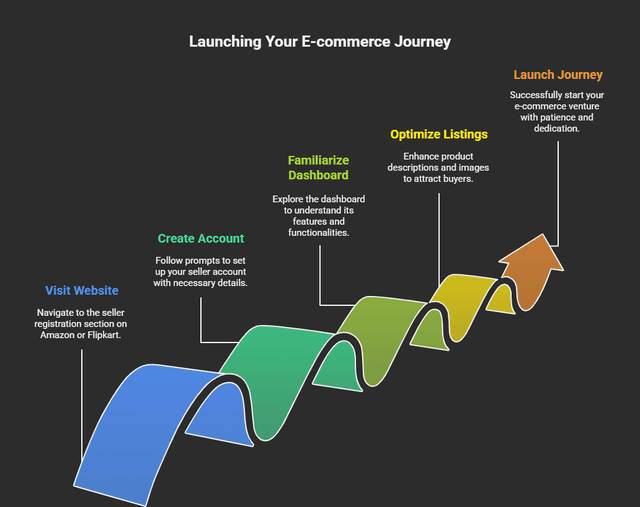
Have you ever dreamed of selling your products online but didn't know where to start? You're not alone. Whether you're an entrepreneur, a small business owner, or just exploring new income streams setting up your first e-commerce seller account on platforms like Amazon or Flipkart is simpler than you think. Let's walk through it, one step at a time.
Step 1: Choose Your Platform Wisely
Both Amazon and Flipkart are incredible platforms but each has a unique audience and fee structure.
• Amazon: Global reach, great for premium or niche products.
• Flipkart: Strong in India, especially for electronics, fashion, and household goods.
Step 2: Gather Your Business Essentials
Before you hit "Register," make sure you have the following ready:
• GST Number: Mandatory for selling online in India.
• PAN Card: Business or personal PAN, depending on your setup.
• Bank Account: A current account for payments.
• Contact Details: Active mobile number and email for verification.
• Product Images: High-quality photos showcasing your product clearly.
Step 3: Create Your Seller Account
Here's how you can set up your account step-by-step:
• For Amazon: Go to sellercentral.amazon.in
• For Flipkart: Visit seller.flipkart.com
Click on "Start Selling" and fill out your business details. You'll be asked for:
• Business name (as per GST)
• Pickup address
• Tax and banking information
• Identity and business proof documents
Step 4: List Your Products Like a Pro
Product listing is where the magic begins! Use this checklist to make your listings shine:
• High-Resolution Images: Show your product from every angle.
• Compelling Title: Add keywords naturally (e.g., "Organic Cotton T-Shirt for Men").
• Detailed Description: Explain benefits, not just features.
• Competitive Pricing: Research your competitors before setting prices.
• Accurate Category: Place your product under the right section to reach your target audience.
Step 5: Manage Inventory & Orders
Once your products go live, monitor them daily. Both platforms offer dashboards to track:
• Stock levels
• Order processing
• Returns and refunds
• Performance metrics
Step 6: Deliver a Great Customer Experience
Customer satisfaction can make or break your online business. Remember:
• Respond quickly to customer queries
• Ship products on time
• Use proper packaging — presentation matters!
• Encourage reviews after successful deliveries
Step 7: Learn, Analyze & Scale
Once your store is live, keep learning and improving. Analyze what's working — and what's not.
• Check which products sell the most
• Monitor bounce rates and returns
• Experiment with advertising and discounts
• Use Seller Central Reports (Amazon) or Flipkart Dashboard to track performance
Final Thoughts
Starting your e-commerce journey might feel overwhelming at first, but every successful seller once started with a single listing. With patience, persistence, and smart strategy you can turn your passion into a profitable business. Remember, the key is to learn, adapt, and deliver value to your customers consistently.